Bridge Pagoda Scene SVG Laser Cut for Stunning Craft and Design Projects
If you're looking to bring a touch of elegance and artistry into your DIY or professional laser cutting projects, the Bridge Pagoda Scene SVG Laser Cut design is an excellent choice. This premium-quality laser cutting design file set features a beautifully detailed scene that captures the essence of traditional architecture in a clean vector format. Whether you're engraving on wood, acrylic, metal, or paper, this design ensures precision and clarity every time.
What Is Bridge Pagoda Scene SVG Laser Cut?
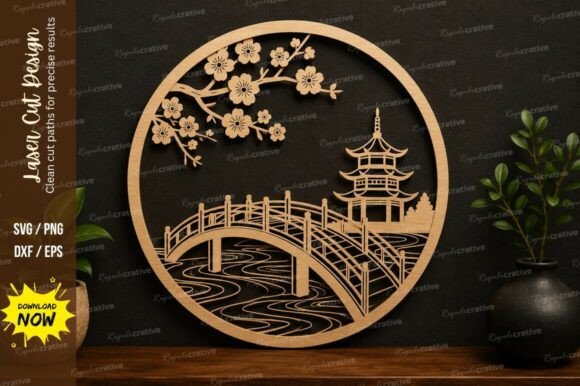
The Bridge Pagoda Scene SVG Laser Cut is a professionally crafted digital design file ideal for laser cutting machines. It showcases a classic pagoda-style bridge often found in East Asian landscapes, rendered with intricate details like railings, arches, and surrounding foliage. The design is optimized for smooth and accurate cutting, making it perfect for both beginners and seasoned users.
This package includes multiple file formats such as SVG, EPS, PNG, and DXF — ensuring compatibility with most design software and laser CNC machines. You can easily resize the design without losing quality, which is especially helpful when adapting it for different materials or project sizes.
Why Choose This Design?
- High-quality vectors: The design is crisp and scalable, so you get clean edges no matter the size you choose.
- Instant download: No waiting around — once you purchase, you’ll have immediate access to all the files.
- Ready for use: It’s already formatted for laser cutting and engraving, saving you time on setup and adjustments.
Use Cases Across Different Industries and Hobbies
Laser cutting has become a go-to technique in many fields, and the Bridge Pagoda Scene SVG Laser Cut fits right in. Here are some real-world scenarios where this design shines:
For Home Decor Enthusiasts
Imagine adding a piece of handcrafted art to your living room or bedroom wall. With the Bridge Pagoda Scene, you can create a stunning decorative panel from wood or acrylic. The intricate details make it look like something you’d find in a high-end store, but since you’re making it yourself, you control the size, color, and material.
One practical example is using it as a backdrop for a photo display or as part of a floating shelf. A hobbyist might even paint the cut-out sections with metallic finishes to give the illusion of a night-lit landscape. The possibilities are endless when you combine creativity with the flexibility of vector graphics.
For Entrepreneurs and Small Business Owners
If you run a small business focused on custom home goods or personalized gifts, this design can be a valuable asset. It works well for creating branded items like engraved keychains, wooden coasters, or acrylic picture frames featuring the pagoda scene. Since the design is ready for laser cutting, you can quickly integrate it into your product line and scale up production as needed.
A boutique owner might offer these designs as part of a “Zen Garden” collection, appealing to customers who appreciate minimalist and nature-inspired decor. The ability to print on various materials allows for customization options like color accents or text overlays, enhancing the uniqueness of each item.
For Educators and Students
In educational settings, the Bridge Pagoda Scene SVG Laser Cut serves as an engaging tool for teaching design principles, engineering, and cultural appreciation. Art students can explore how to translate complex visual elements into precise vector paths, while STEM educators can use it to demonstrate structural design or symmetry in architecture.
Schools with maker spaces or tech labs often incorporate laser cutting into their curriculum. This design could be used in a group project where students collaborate to assemble a multi-layered model of the pagoda. It also makes a great resource for demonstrating how to use design software like Adobe Illustrator or CorelDRAW before sending the file to a laser cutter.
For Event Planners and Marketers
Event planners love unique centerpieces and signage, and the Bridge Pagoda Scene offers just that. It can be laser-cut onto lightweight wood or foam board to serve as a focal point at weddings, retreats, or cultural events. The design can also be adapted for promotional materials like engraved invitations or packaging inserts for eco-friendly products.
Marketers aiming to stand out can include this artwork in limited-edition campaigns. For instance, a travel agency promoting a Japan-themed tour could feature the pagoda in a series of custom magnets or luggage tags. These subtle touches can help reinforce brand identity and evoke a sense of place and tradition.
Real Outcomes from Real Use
Let’s look at what people actually achieve with the Bridge Pagoda Scene SVG Laser Cut:
- Custom Wood Panels for Interior Design: A designer used the design to create a set of panels for a client’s new office space. The result was a calming, culturally rich aesthetic that complemented the existing décor perfectly.
- Acrylic Keychains for a Pop-Up Shop: A local craft fair vendor downloaded the design and had a batch of acrylic keychains made overnight. They sold out within hours due to their eye-catching detail and universal appeal.
- Engraved Metal Ornaments for Holiday Sales: A family-run workshop created holiday ornaments by engraving the design onto thin brass sheets. The ornate yet delicate look attracted a wide range of customers, boosting their seasonal revenue.
How to Get Started
Using the Bridge Pagoda Scene SVG Laser Cut is straightforward, but there are a few things to consider before diving in:
- Machine Compatibility: While the included formats work with most laser CNC machines, always check your machine’s specifications to ensure optimal results.
- Material Thickness: Some designs may require more power or slower speeds depending on the material thickness. Test cuts on scrap pieces first to fine-tune your settings.
- Design Software Proficiency: If you’re not already familiar with programs like Inkscape or Adobe Illustrator, take some time to learn the basics of editing vector files before starting your project.
- Project Planning: Think about the final application — will it be mounted? Will it need painting or sealing? These factors influence how you prepare and execute the cut.
Once you’ve considered these points, simply download the files and open them in your preferred software. Adjust the size as needed, then send the design to your laser cutter. You’ll be amazed at how smoothly everything comes together thanks to the clean lines and thoughtful layout of the design.
Expanding Your Creative Possibilities
Beyond its primary function, the Bridge Pagoda Scene SVG Laser Cut can inspire a variety of creative adaptations. Artists might layer multiple versions of the design to create depth in shadow boxes. Others could use it as a stencil for spray-painting or etching on glass surfaces.
Freelancers working with clients who want something memorable can suggest incorporating the pagoda motif into custom packaging, branding elements, or even furniture inlays. Its timeless appeal makes it versatile enough to blend into modern interiors while still honoring traditional aesthetics.
Practical Tips for Best Results
To make the most of your Bridge Pagoda Scene SVG Laser Cut:
- Always preview the design on your screen before printing to confirm alignment and proportions.
- Use a test material like cardboard or scrap wood to verify cut depth and speed before working on your final piece.
- Don’t forget to clean your laser cutter after use to maintain its performance and accuracy.
- Consider combining the pagoda with other elements — like birds, water ripples, or lanterns — to enhance the scene’s storytelling potential.
These small steps can significantly impact the outcome of your project, helping you avoid common pitfalls and produce a polished final product.
Who Can Benefit and Why?
Whether you're a DIY enthusiast, a product designer, a teacher, or someone who wants to add a meaningful touch to their workspace or home, this design delivers value. It's particularly beneficial for those who:
- Need a reliable, high-resolution design for commercial or personal use.
- Want to streamline their workflow by using pre-optimized laser cutting files.
- Are passionate about architectural themes or nature-inspired art.
- Seek to create one-of-a-kind items that reflect craftsmanship and attention to detail.
Its adaptability across materials and uses means you won't be stuck with a single application. Instead, you'll have a foundation to build upon, whether you're crafting a gift, designing a logo, or creating an educational exhibit.
Where to Find It and What to Expect
You can typically find the Bridge Pagoda Scene SVG Laser Cut available for download on trusted platforms specializing in laser cutting resources. Look for sellers who provide clear previews and customer support if you need assistance with scaling or positioning the design.
When you download the file set, you’ll receive a ZIP folder containing all the supported formats. Each file is clearly labeled, making it easy to select the correct one for your software or machine. No unnecessary clutter, just what you need to start cutting right away.
Conclusion: A Design That Fits Many Needs
The Bridge Pagoda Scene SVG Laser Cut is more than just a pretty image — it's a functional, adaptable design that opens doors for creativity in numerous ways. From personal crafts to professional product development, it provides a strong base for producing high-quality, visually striking items.
By choosing a design that’s been carefully prepared for laser cutting, you save time and reduce frustration, allowing you to focus on bringing your vision to life. Whether you're cutting for a special event, a classroom activity, or a weekend project, this file set gives you the tools to succeed.
So, next time you're planning a project that needs a bit of artistic flair and technical precision, remember the Bridge Pagoda Scene SVG Laser Cut — a design that bridges the gap between beauty and utility.